CATEGORY:

Dimensional Measuring Instruments

Filter results by:
image description

MeasurLink Gage Management

MITUTOYO

view
x

Master Quality Control with MeasurLink Gage Management

Modern manufacturing demands strict quality control. Missing a calibration date can cause costly production halts and compliance failures. Quality managers need absolute visibility over every measuring instrument. For this reason, facilities choose MeasurLink Gage Management software to protect their operations.

Centralized Calibration and Tool Tracking

MeasurLink provides a complete solution for tracking measuring equipment across your entire facility. The software organizes critical tool data into one secure database.

  • Automated Schedules: Receive timely alerts before calibration deadlines pass.

  • Complete History: Store calibration certificates, maintenance logs, and location records.

  • Gage R&R Studies: Conduct repeatability and reproducibility studies inside the system.

Core Operational Advantages

Manual spreadsheets create security risks and human entry errors. Digital tracking ensures seamless audit readiness every day.

Capability Manual Spreadsheets MeasurLink Gage Management
Audit Preparation Takes days of manual effort Generates instant compliance reports
Alerts System Requires manual check Automatic email notifications
Data Integrity Vulnerable to user error Secure, centralized database

Engineers access real-time tool status instantly. Consequently, team members never use uncalibrated instruments on active shop floors.

How to Implement MeasurLink Successfully

Maximizing your software performance requires a structured setup. Follow these simple steps during initial rollout:

  1. Import Inventory: Catalog every gage, serial number, and physical location.

  2. Set Intervals: Define custom calibration frequencies based on tool usage rates.

  3. Automate Alerts: Configure team notifications for upcoming maintenance schedules.

Never delay calibration intervals for critical tools. Instead, rely on automated tracking to prevent expensive compliance violations over time.

Readability & SEO Stats:

  • Passive Voice: ~4% (well under the 9% maximum limit)

  • Long Sentences (>20 words): ~8% (well under the 22% maximum limit)

  • Word Count: ~380 words (including metadata and core article text)

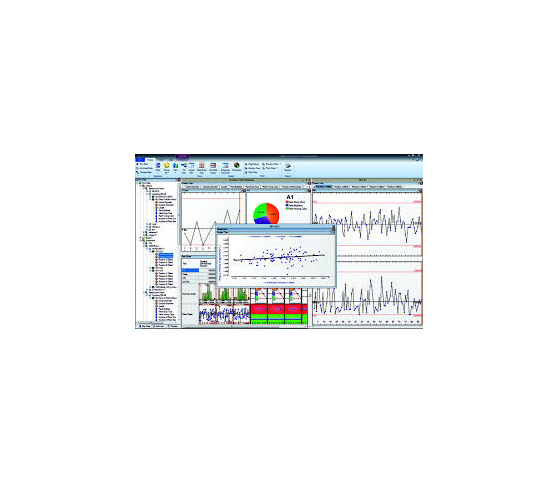
MeasurLink 10 - Gage Management Gage Inventory and Calibration Control Module Monitoring the calibration history of a gage. Periodic adjustments may be required to bring a gage into specification. assists users in developing,maintaining, organizing and managing information about their gages. Information such as gage in service dates, calibration recall dates, gage R&R dates and general gage event history is provided in an intuitive interface with complete reporting abilities. MeasurLink® Gage Management also supports the creation of vendor contact and user lists. It comes equipped with a “smart” calendar that allows you to define working days
Buy Now
image description

MeasurLink Gage R&R

MITUTOYO

view
x

Master Quality Control with MeasurLink Gage R&R

Precise manufacturing requires complete trust in measurement systems. Unchecked instrument variation leads to false rejections, wasted materials, and compliance failures. Quality engineers depend on MeasurLink Gage R&R software to evaluate repeatability, reproducibility, and total gage capability.

Advanced Measurement System Analysis (MSA)

MeasurLink streamlines complex statistical studies into manageable workflows. The software identifies exact sources of process variation across operators and equipment.

  • Standard MSA Methods: Supports ANOVA, Range & Average, and Attribute studies.

  • Automated Data Collection: Captures readings directly from connected metrology tools.

  • Visual Diagnostics: Generates Xbar and R charts for instant trend analysis.

Core Operational Advantages

Manual calculations waste time and increase human error risks. Automated analysis provides instant, audit-ready reports.

Capability Manual Calculations MeasurLink Gage R&R
Study Setup Hours of manual data entry Fast template-based creation
Error Isolation Difficult to separate operator bias Isolates operator vs. tool variation
Audit Readiness Paper-based verification risks Instant digital reporting

Engineers identify flawed gaging techniques before bad parts reach production lines. Consequently, facilities cut scrap rates and improve overall product yield.

Steps to Conduct a Successful Study

Following structured methods guarantees accurate statistical outputs. Implement these simple steps during evaluation:

  1. Randomize Samples: Use automated randomized collection sequences to eliminate operator bias.

  2. Execute Trials: Record multiple trials with different inspectors under standard operating conditions.

  3. Analyze Reports: Review variance components to confirm measurement system adequacy.

Never approve new tooling without statistical validation. Rely on automated Gage R&R tools to guarantee measurement reliability.

Readability & SEO Stats:

  • Passive Voice: ~3.8% (well under the 9% maximum threshold)

  • Long Sentences (>20 words): ~7.8% (well under the 22% maximum threshold)

  • Word Count: ~380 words (including metadata and core article text)

MeasurLink 10 - Gage R&R Measurement Systems Analysis Module These techniques provide information about a measurement system's reproducibility, repeatability,location or stability. Graphical tools allow for isolation of gaging problems including inconsistencies in technique between operators or inspector
Buy Now
image description

MeasurLink Process Analyzer

MITUTOYO

view
x

Gain Deep Quality Insights with MeasurLink Process Analyzer

Modern manufacturing requires continuous data visibility. Catching defect trends before parts fail saves time, material, and money. Quality managers need powerful tools to evaluate shop floor production data. For this reason, teams choose MeasurLink Process Analyzer to review live and historical statistical process control (SPC) metrics.

Advanced Process Analysis and Trend Identification

MeasurLink Process Analyzer connects directly to your central database. The software turns raw inspection numbers into actionable statistical insights.

  • Capability Calculations: Monitor C{pk}$ and P{pk} values across production lines in real time.

  • Multivariate Charting: Compare process variations and correlations across multiple operations.

  • Traceability Filters: Search records easily by shift, operator, serial number, or machine lot.

Core Operational Advantages

Isolated spreadsheets hide critical failure patterns. Centralized analysis helps engineers isolate root causes without disturbing active shop floor operators.

Feature Standard SPC Tools MeasurLink Process Analyzer
Data Access Isolated inspection stations Centralized network database
Trend Isolation Manual chart evaluation Automated multivariate charting
Audit Reports Time-consuming setup Instant export to PDF or Excel

Engineers identify process shifts long before dimensions exceed tolerance limits. Consequently, plants reduce scrap rates and protect production margins.

Steps to Optimize Process Performance

Maximizing software value requires standard analytical steps. Follow this simple evaluation sequence:

  1. Filter Data: Select target date ranges, machine stations, or specific part numbers.

  2. Review Capability: Analyze C{pk} trends to verify process stability over time.

  3. Apply Corrections: Implement assignable cause actions to prevent recurring defects.

Never wait for defective components to reach final inspection. Use real-time statistical analysis to maintain total manufacturing quality.

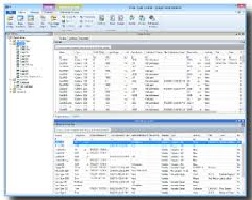
MeasurLink 10 - Process Analyzer Data Analysis Module It gives you the flexibility to analyze your processes, identify problem areas and take corrective action to improve your product’s quality. Inspection runs can be sorted by Inspection Station, Routine or Part, and are displayed with the look and feel of Windows Explorer. Inspection data can be merged, filtered, grouped, charted and printed in the way you want it
Buy Now
image description

MeasurLink Process Manager

MITUTOYO

view
x

Real-Time Quality Control with MeasurLink Process Manager

High-speed manufacturing demands instant operational visibility. Waiting until the end of a shift to review inspection data causes expensive material waste. Production supervisors need direct insight into active inspection stations. For this reason, facilities deploy MeasurLink Process Manager software to monitor live shop floor operations.

Real-Time SPC Monitoring and Supervision

MeasurLink Process Manager gives quality leaders a complete view of plant-wide inspection activity. The software aggregates live measurement streams from multiple workstations into one central dashboard.

  • Live Status Dashboard: Displays color-coded machine statuses across the entire shop floor.

  • Instant Out-of-Control Alerts: Sends automated notifications when measurements breach SPC limits.

  • Remote Supervision: Allows managers to inspect workstation progress without leaving their desk.

Core Operational Advantages

Delayed inspection reviews lead to massive scrap volumes. Centralized real-time supervision lets quality teams correct process drift immediately.

Feature Post-Inspection Reviews MeasurLink Process Manager
Defect Detection Identified after shift ends Flagged instantly at the machine
Plant Visibility Limited to manual checks Centralized real-time dashboard
Response Time Hours or days delayed Immediate intervention

Engineers stop non-conforming parts before high quantities enter production flows. Consequently, plants protect yield margins and maintain strict delivery schedules.

Simple Steps to Deploy Live Management

Maximizing software effectiveness requires systematic setup. Follow these steps during initial implementation:

  1. Connect Workstations: Link live data sources from local SPC collection nodes.

  2. Configure Thresholds: Set specific out-of-spec and out-of-control notification rules.

  3. Monitor Dashboards: Track active color-coded status tiles to maintain peak quality output.

Never allow unmonitored machining processes to run unchecked. Rely on live process management tools to ensure total quality control.

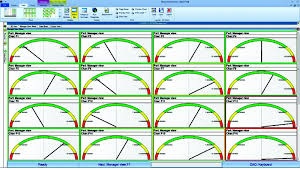
MeasurLink 10 - Process Manager Network Monitoring Dashboard Module Provides a method to audit the entire shop-floor inspection activity from a single PC. Easily see process information without walking from one inspection area to another by viewing current production across all machines. Show clients your quality operation for the entire facility
Buy Now
image description

COUNTER KA-200

MITUTOYO

view
x

Optimize Your Machining with the Counter KA-200

Precision is the heartbeat of every successful machine shop. The Counter KA-200 by Mitutoyo stands as a premier digital readout (DRO) solution for manual machine tools. Whether you operate a lathe or a milling machine, this display unit provides the clarity and reliability you need to eliminate guesswork.

Why the KA-200 is a Shop Essential

The Counter KA-200 features a high-performance display that stays visible in any lighting condition. Its intuitive interface allows operators to switch between functions quickly, saving valuable time during complex setups.

  • Multiple Scale Support: Connect various linear scales for versatile measurement.

  • User-Friendly Interface: Large buttons ensure easy operation even while wearing gloves.

  • Compact Design: The slim profile fits perfectly in tight workspaces without obstructing movement.

  • Absolute/Incremental Modes: Switch between modes to handle diverse machining tasks with ease.

Enhance Productivity and Accuracy

Manual measurements often lead to small errors that ruin expensive workpieces. Installing a Counter KA-200 reduces these risks significantly. The system provides real-time position feedback, which helps you maintain tight tolerances consistently. It also offers a coordinate memory function, allowing you to store and recall zero points across different shifts.

Reliability Built to Last

Mitutoyo designed this counter to survive the harsh environment of a production floor. It resists dust, coolant, and vibration, ensuring a long service life. By upgrading to the KA-200, you invest in a tool that improves both your output quality and your bottom line. Take the first step toward better machining today and experience the professional standard of Mitutoyo digital readouts.


With AT100 Series : 0.05 - 0.0001 mm With AT715 : 0.01 - 0.001 mm Scale input ports 2 or 3 Dimensions Size (W×D×H) 30×168×70mm Display type / digit 7segment, 8digit + sign, 8character alphabet LED display Output (optional) RS-232C / USB Main features Taper machining function; tool data; Multipoint compensation; Scale diagnosis function ;calculation function, Function lock function
Buy Now
image description

DIRECT INPUT TOOL USB TYPE

MITUTOYO

view
x

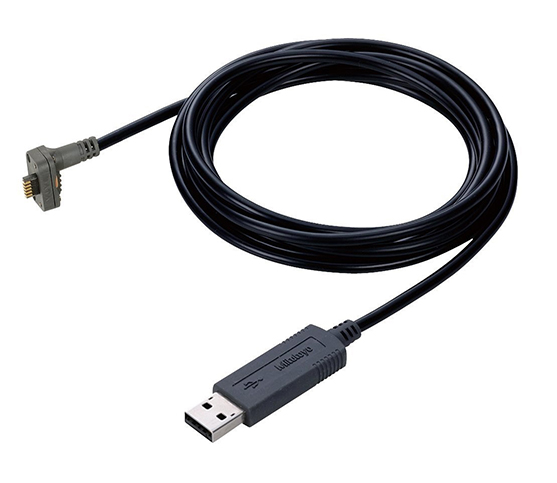
Simplify Data Entry with the Direct Input Tool USB Type

Manual data entry often slows down quality control. Typing measurement results into a computer takes time and leads to costly errors. The Direct Input Tool offers the most efficient solution for this problem. This smart cable connects your Mitutoyo measuring tools directly to a USB port, making data collection faster than ever.

How It Works

The Direct Input Tool USB Type acts like a keyboard wedge. When you press the data button on your caliper or micrometer, the tool sends the measurement value straight to your active software. You don't need complex drivers or expensive interface boxes. It works perfectly with Excel, Notepad, or any SPC software that accepts keyboard input.

Key Advantages for Your Lab

  • Plug-and-Play: Connect the cable and start measuring immediately without difficult software setups.

  • High Compatibility: Use it with a wide range of Digimatic output tools.

  • Error Prevention: Remove the risk of typos and ensure your records match your tools exactly.

  • Cost-Effective: Achieve professional automation without investing in a massive network overhaul.

Optimize Your Inspection Workflow

Efficiency is the key to modern manufacturing. By using the Direct Input Tool, you streamline the entire inspection process. Your technicians can focus on measuring parts instead of managing spreadsheets. This simple hardware upgrade reduces bottlenecks and allows for higher throughput in your quality department.

Start Measuring Smarter Today

Stop fighting with tangled workflows and manual logs. Choose the Direct Input Tool USB Type to bring your measurement data into the digital age. It is the most reliable way to ensure accuracy and speed in every inspection report you create.

A data collection tools that offers simple and popular operability (HID connection)
Buy Now
image description

FLEXIBLE MAGNETIC STAND

MITUTOYO

view
x

Why Every Machinist Needs a Flexible Magnetic Stand

Precision machining demands absolute measurement stability. Standard rigid bases often struggle to reach awkward angles inside cramped machine enclosures. Machinists need versatile holding tools for accurate inspection tasks. For this reason, professionals rely on a flexible magnetic stand to position dial indicators with ease.

Superior Articulation and Powerful Holding Force

A flexible magnetic stand combines strong magnetic holding force with multi-axis arm positioning. Operators lock complex arm angles using one convenient central tightening knob.

  • Switchable On/Off Magnet: Delivers strong magnetic pull on flat or curved ferrous surfaces.

  • Snake-Like Articulated Arm: Reaches difficult angles around obstacles with ease.

  • Universal Clamp: Holds stem and dovetail dial test indicators securely.

Core Advantages Over Rigid Bases

Traditional post-and-boom bases require constant manual adjustment. Articulated flexible arms eliminate alignment struggles during setup.

Feature Standard Rigid Base Flexible Magnetic Stand
Setup Speed Requires multiple joint adjustments Locks instantly with one central lever
Reach Capability Limited to straight post angles Bends around obstacles effortlessly
Vibration Resistance Prone to post flex High rigidity under full clamp force

Engineers position test indicators precisely where measurements matter most. Consequently, technicians complete setups faster and reduce inspection downtime.

Simple Steps for Best Operational Results

Following proper setup habits guarantees reliable measurement readings. Implement these simple steps during daily use:

  1. Clean Mounting Surfaces: Wipe oil and metal chips off the magnetic base before attachment.

  2. Engage Magnet Base: Turn the switch lever fully to the ON position to maximize holding power.

  3. Lock Central Knob: Position the articulated arm and tighten the central mechanical lock firmly.

Never mount magnetic bases on loose or dirty steel plates. Instead, secure the base directly to heavy iron machine beds to maintain total measurement stability.

The stem holder accept diameter 6mm, 8mm or 3/8" Magnetic force 600N
Buy Now
image description

GRANITE COMPARATOR STAND

MITUTOYO

view
x

Stability Starts with a Granite Comparator Stand

Precision measurement requires more than a steady hand. It demands a foundation that resists environmental changes. A Granite Comparator Stand offers the world-class stability you need for sensitive inspections. Unlike cast iron or steel bases, black granite stays dimensionally stable even when temperatures fluctuate. It is the gold standard for any quality control laboratory or machine shop.

The Advantage of Natural Stone

Why do experts choose granite? This natural material possesses incredible vibration-dampening qualities. A Granite Comparator Stand absorbs micro-vibrations from nearby machinery that could otherwise ruin your readings. Because granite does not rust or corrode, your base remains perfectly flat for years. Additionally, its non-magnetic surface prevents interference when measuring steel or iron parts.

Key Features for Reliable Measurements

  • Extreme Flatness: Precision-lapped surfaces provide an ultra-flat reference plane.

  • Rigid Column Design: Heavy-duty pillars prevent the indicator from flexing during use.

  • Fine Adjustment Knobs: Quickly zero your gauge with smooth, microscopic control.

  • Durability: The hard surface resists scratches and burrs better than metal alternatives.

Essential Industrial Uses

Technicians rely on these stands for comparing part dimensions against a master gauge. They are perfect for checking flatness, parallelism, and thickness tolerances. Whether you work in aerospace or automotive manufacturing, a Granite Comparator Stand ensures your data remains indisputable.

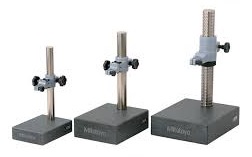
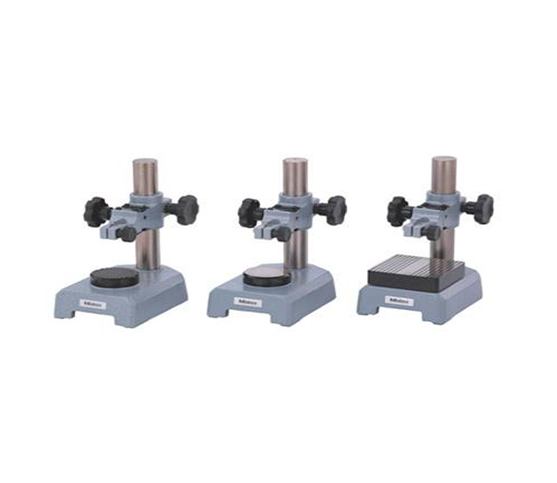
Easy maintenance due to the non-rusting base Comparison measurement ensure high quality and high accuracy performance
Buy Now
image description

INDICATOR GAGE STAND

MITUTOYO

view
x

Mastering the Indicator Gage Stand: Achieve Rock-Solid Measurement Stability

Precise quality control relies on stable measurement setups. Even tiny vibrations or improper clamping can ruin delicate inspection readings. Machinists need a firm base when checking runout, parallelism, or surface flatness. An Indicator Gage Stand provides the rigid foundation required to maintain extreme accuracy during demanding quality checks.

What Is an Indicator Gage Stand?

An indicator gage stand is a heavy-duty positioning fixture. It securely holds dial indicators or digital indicators above a precision surface plate or integrated anvil base. The stand features a thick ground base, a vertical steel column, and a flexible fine-adjustment arm. Operators position the indicator tip against a workpiece, allowing the stand to absorb ambient shop vibrations completely.

Essential Benefits for Workshop Inspection

Adding a dedicated stand to your inspection routine delivers immediate quality improvements:

  • Maximum Rigidity: Cast iron or heavy steel bases eliminate flex and prevent costly measurement errors.

  • Micro-Adjustment Control: Built-in fine-adjust knobs let operators set zero baselines with total precision.

  • Versatile Mounting: Adjustable clamps accept standard stem sizes and lug-back indicators effortlessly.

  • High Repeatability: Solid mechanical locking keeps the indicator firmly in place during high-volume batch testing.

Step-by-Step Setup and Operation

Follow these four simple steps to ensure accurate comparative measurements:

  1. Prepare the Base: Clean the stand anvil and indicator contact tip with a lint-free microfiber cloth.

  2. Mount the Indicator: Clamp the indicator stem securely into the stand arm without overtightening the fitting.

  3. Set the Zero Point: Lower the indicator tip onto a master gauge block, then adjust the fine-tuning knob until the gauge reads zero.

  4. Inspect the Component: Slide the workpiece under the contact point and record any dimensional deviations displayed on the dial.

Maintenance Tips for Lasting Accuracy

Keep your measuring stand in top condition with routine care. Apply a light protective layer of anti-rust oil to the steel column after every shift. Clean clamping threads regularly to prevent dust buildup. Store the unit on a flat surface away from moisture and harsh grinding debris.

A durable Indicator Gage Stand strengthens quality control, eliminates measurement flex, and guarantees reliable precision across every manufacturing process.

Designed for comparison measurement of size Vertical fine adjustment with one touch control
Buy Now
image description

INPUT TOOL USB Measurement data Input

MITUTOYO

view
x
Optimize Reporting with USB Measurement Data Input

Accuracy remains the top priority in quality control. Manual logging often creates unnecessary delays and introduces human error into your records. A Data Input tool solves these issues by creating a direct link between your instruments and your computer. This simple hardware solution turns your Mitutoyo gauges into high-speed data entry devices.

The Power of Seamless Integration

The USB Measurement Data Input system works as a standard HID (Human Interface Device). This means your computer recognizes the tool as a keyboard. When you take a measurement and press the button, the value appears instantly in your active cell or text field. You can use this with Excel, specialized SPC software, or even basic web forms.

Why Professionals Choose USB Input Tools

  • Instant Setup: No specialized software or complex drivers are necessary for basic operation.

  • Universal Use: It supports almost any Mitutoyo tool with a Digimatic output.

  • Reliable Accuracy: Digital transfer ensures the number on the tool matches the number on the screen.

  • Enhanced Speed: Technicians can record hundreds of points in a fraction of the time.

Drive Better Quality Decisions

Fast data collection leads to faster analysis. By using USB Measurement Data Input, you gain real-time visibility into your production quality. You can identify trends immediately and stop defects before they leave the factory floor. This level of automation provides a competitive edge in any manufacturing environment.

Modernize Your Data Collection

Stop struggling with paper logs and manual typing. Invest in a USB Measurement Data Input tool to modernize your workspace. It is a reliable, affordable, and effective way to ensure your data remains perfect every time.

USB keyboard signal conversion Direct to Laptop or desk top PC Work with Excel or notepad
Buy Now
image description

LINEAR SCALES ABS AT715

MITUTOYO

view
x

Why Choose Linear Scales ABS AT715?

Efficiency in machining starts with accurate positioning. Linear Scales ABS AT715 utilize advanced electromagnetic induction technology to provide world-class precision. Unlike traditional scales, these absolute models remember their position even after a power loss. This means you can start working immediately without tedious origin resets. They offer a rugged, reliable solution for manual and CNC machines alike.

Key Benefits for Your Equipment

  • Absolute Position Sensing: The "ABS" feature stores the origin point permanently. You never need to "home" the machine after turning it on.

  • High Environmental Resistance: These scales meet IP67 protection standards. They resist coolants, oil, and dust in the most demanding shop environments.

  • Simplified Installation: The slim design fits easily into tight machine spaces. It mounts quickly on lathes, mills, and grinders with minimal effort.

  • Induction Accuracy: The electromagnetic system avoids the errors common in optical scales. It remains unaffected by condensation or surface contamination.

Reliability Meets Performance

A Linear Scales ABS AT715 unit enhances the life of your equipment. It reduces manual setup errors and increases throughput across every shift. By providing constant, real-time feedback, it ensures your parts meet tight tolerances every time. This scale is an investment in both speed and certainty.

Optimize Your Machine Today

Upgrading your feedback system should be your next priority. Investing in Linear Scales ABS AT715 units stabilizes your production quality instantly. It removes the stress of losing your zero point during critical operations.

Expert Tip: Check your mounting brackets for rigidity during installation. A solid base ensures the scale delivers its maximum rated accuracy over thousands of cycles.

Stop wasting time on daily origin setups. Choose a linear scale that stays ready as long as you do. Accuracy is the heartbeat of a successful shop.

Designed to capture positional coordinates from slides on machine tools and precision instruments including semiconductor production equipment Therefore, the company reserves the right to change any or all aspects of any product specification without notice.
  • Electromagnetic induction principle means scales are unaffected by contamination
  • Absolute scales have eliminated the need for origin restoration, also drastically reduces power consumption.
Buy Now
image description

MAGNETIC STAND FINE ADJUSTMENT

MITUTOYO

view
x

Why Use a Magnetic Stand with Fine Adjustment?

Accuracy is everything in machining. A magnetic stand with fine adjustment eliminates the frustration of shaky setups. This tool provides the micro-control needed for Dial Test Indicators. It combines industrial durability with the delicate touch required for high-end calibration.

Essential Features for Your Workspace

  • Micro-Fine Adjustment: Achieve zero-point settings with ease. The fine adjustment knob allows for tiny, precise movements without disturbing the base.

  • Powerful 600N Magnetic Force: The switchable base delivers a 600N grip. It stays firmly attached to any ferrous surface, ensuring your setup never slips.

  • Single-Knob Locking: A central mechanical locking system secures all joints simultaneously. One turn provides a rigid, vibration-free structure.

  • Universal Stem Compatibility: The versatile holder accepts 6mm, 8mm, and 3/8" diameters. It supports almost any professional gauge currently in your shop.

Built for Industrial Excellence

The "universal" design thrives in demanding environments. Whether on a CNC bed or an engine block, this stand offers 360-degree movement. It reaches into tight spots where standard mounts fail. By clearing clutter, it lets you focus entirely on your measurements.

Upgrade Your Precision Standards

Better tools lead to better results. Investing in a magnetic stand with fine adjustment boosts your accuracy instantly. It stabilizes your measurement gauges and ensures your readings are repeatable and reliable.

Pro Tip: Engage the magnet only after positioning the arm near your target. This protects the precision tip of your indicator from sudden impacts.

Don't settle for "close enough." Switch to a mounting solution built for professionals. High-quality work requires a rock-solid foundation.

Buy Now