CATEGORY:

Dimensional Measuring Instruments

Filter results by:
image description

EC Counter - Display Unit for Digimatic Indicator

MITUTOYO

view
x

Remote Precision: EC Counter - Display Unit for Digimatic Indicator

Reading small indicator displays inside automated fixtures creates serious visibility challenges for machine operators. Standard measuring heads mounted inside deep machine frames force technicians to stretch awkwardly to verify dimensions. The EC Counter - Display Unit for Digimatic Indicator resolves this setup bottleneck by providing a remote digital readout for smooth shop monitoring.

This guide explores how integrating a digital display counter elevates quality control productivity.

What Is the EC Counter - Display Unit for Digimatic Indicator?

The EC Counter is a compact electronic readout unit manufactured by Mitutoyo for Digimatic measuring heads.

Designed specifically for panel mounting, this display connects directly to Digimatic output indicators, calipers, and linear gages. Operators place the large digital screen outside machine enclosures to track live measurement results continuously from a safe distance.

Key Operational Advantages

Upgrading to an external display counter delivers clear technical benefits for manufacturing lines:

  • Large LED Display: Oversized digital characters ensure clear display visibility from extended viewing distances.

  • Tolerance Judgment LEDs: Features bright green and red LED indicators for fast GO/NG quality decisions.

  • Compact DIN Dimensions: Fits standard industrial control panels easily using standard DIN-size cutouts (96 x 48 mm).

  • Data Output Signal: Exports tolerance signal outputs directly to external PLCs for automated machine control.

Common Workshop Applications

Quality engineers and machine builders rely on the EC Counter for automated inspection setups:

  1. In-Line Fixture Monitoring: Mount the display unit on custom assembly fixtures to check component thickness.

  2. Automated Machine Control: Send GO/NG output signals directly to programmable logic controllers for sorting.

  3. Remote Measurement Reading: Position display panels away from hazardous or enclosed measuring areas.

  4. Benchtop Quality Stations: Create clean inspection stations with dedicated wall-mounted digital counters.

How to Set Up in 4 Easy Steps

Follow these simple steps to configure your display counter:

  1. Mount the Unit: Secure the counter into your panel cutout using supplied mounting brackets.

  2. Connect the Indicator: Plug your Digimatic output cable firmly into the rear input port.

  3. Set Tolerance Limits: Program high and low upper limits using front panel navigation keys.

  4. Begin Inspection: Pass target workpieces under the gauge and observe instant GO/NG light responses.

Final Thoughts

The EC Counter - Display Unit for Digimatic Indicator transforms cramped measurement checks into fast, visual routines. By improving display access, this reliable readout unit boosts quality control efficiency across your facility.

Limit setting available Tolerance judgment function Small size : 96x48mm
Buy Now
image description

Indicator Lug Back

MITUTOYO

view
x

Secure Metrology: The Machinist’s Guide to Indicator Lug Backs

Securing dial gauges firmly during inspection routines prevents costly measurement errors in busy machine shops. Stem-clamping alone can pinch internal spindles or shift under heavy vibration. An Indicator Lug Back resolves this mounting challenge by providing a central mounting tab on the rear housing for rigid positioning.

This guide explores how using a lug back accessory elevates quality control setup efficiency.

What Is an Indicator Lug Back?

An Indicator Lug Back is a rear replacement plate featuring a projecting mounting tab with a precision hole.

Designed for standard mechanical and digital indicators, this accessory replaces flat rear covers. Technicians slide mounting pins or dovetail clamps through the lug hole to attach the gauge firmly to magnetic bases and transfer stands.

Key Advantages for Machinists

Upgrading to a lug back rear plate offers clear technical benefits for quality inspectors:

  • Pinch-Free Mounting: Secures the gauge housing directly without over-tightening stem clamps that bind spindle movement.

  • Rigid Position Stability: Holds the dial indicator steady against operational vibrations during continuous shop checks.

  • 360-Degree Swivel Mounting: Allows flexible angle adjustments on magnetic stand holding arms for cramped inspection setups.

  • Standardized Compatibility: Fits industry-standard 1/4-inch (6.35 mm) mounting pins across various metrology fixtures.

Common Workshop Applications

Machinists and quality technicians rely on lug back indicators for daily setup tasks:

  1. Magnetic Stand Alignment: Clamp indicators securely to magnetic bases for lathe and milling machine setups.

  2. Transfer Stand Inspection: Mount gauges on granite surface plate transfer stands for precise height checks.

  3. Custom Fixture Integration: Bolt indicators directly into multi-gauge inspection jigs for production runs.

  4. Machinery Runout Checks: Measure shaft deflection and flycutter runout without risking gauge displacement.

How to Install in 4 Easy Steps

Follow these simple steps to mount your indicator using a lug back plate:

  1. Remove Flat Back: Unscrew four corner screws on the rear cover and lift off the flat plate.

  2. Attach Lug Plate: Position the lug back plate over the housing and tighten original screws evenly.

  3. Mount on Stand Arm: Insert the holding pin of your magnetic base through the lug hole.

  4. Lock and Align: Tighten clamp screws securely and align the dial face for clear viewing.

Final Thoughts

The Indicator Lug Back turns awkward gauge setups into stable, repeatable mounting routines. By securing dial indicators rigidly, this simple hardware accessory protects measurement accuracy across your manufacturing facility.

Optional accessory for digimatic and dial indicator
Buy Now
image description

Indicator SPINDLE LIFTING CABLE

MITUTOYO

view
x

Effortless Inspection: Indicator SPINDLE LIFTING CABLE Guide

Lifting indicator spindles manually during rapid inspection routines can disturb delicate measuring setups. Touching the gauge spindle directly risks transferring body heat, scratching ground workpiece surfaces, or shifting the magnetic base. An Indicator SPINDLE LIFTING CABLE resolves this operational hurdle by enabling smooth, remote spindle retraction via a flexible release wire.

This guide explores how adding a lifting cable accessory elevates inspection accuracy and speed.

What Is an Indicator SPINDLE LIFTING CABLE?

An Indicator SPINDLE LIFTING CABLE is a flexible, plunger-actuated cable release accessory for dial and digital indicators.

Designed to screw directly into the top stem of the measuring spindle, this tool features an internal wire mechanism. Quality inspectors press a remote push-button plunger to raise the indicator contact point smoothly without touching the gauge body directly.

Key Operational Advantages

Integrating a spindle release cable delivers clear practical benefits for quality assurance technicians:

  • Vibration-Free Actuation: Retracts the spindle remotely, preventing hand vibration from shifting sensitive indicator setups.

  • Workpiece Protection: Prevents contact points from dragging across and scratching highly polished master components.

  • Faster Repeat Checks: Speeds up high-volume part insertion and removal cycles during batch inspection runs.

  • Smooth Flexible Reach: Flexible sheath allows operators to actuate indicators placed inside tight machine enclosures effortlessly.

Common Workshop Applications

Machinists and quality control technicians rely on spindle lifting cables for critical daily tasks:

  1. High-Volume Production Checks: Retract contact points rapidly to insert target parts into inspection fixtures.

  2. Surface Plate Metrology: Protect delicate master gauge blocks and surface finishes from probe drag marks.

  3. Enclosed Fixture Inspection: Actuate indicators mounted in cramped positions inside automated measuring stations.

  4. Comparative Quality Audits: Perform rapid comparative height checks without disturbing magnetic base positions.

How to Install in 4 Easy Steps

Follow these simple steps to install and operate your lifting cable:

  1. Remove Top Cap: Unscrew the protective dust cap on the top of the indicator spindle.

  2. Thread the Cable: Screw the cable adapter tip firmly into the threaded spindle top hole.

  3. Check Wire Travel: Press the remote plunger button to ensure full, smooth spindle retraction.

  4. Begin Inspection: Position target parts, release the cable plunger gently, and record your reading.

Final Thoughts

The Indicator SPINDLE LIFTING CABLE turns delicate gauge actuation into a smooth, error-free routine. By eliminating physical touch during inspection, this simple metrology accessory protects part finishes and maintains strict shop standards.

Spindle lifting cable with auto-stop function
Buy Now
image description

Indicator SPINDLE LIFTING LEVER

MITUTOYO

view
x

Efficient Inspection: Indicator SPINDLE LIFTING Lever Guide

This guide explores how adding a lifting lever accessory boosts shop productivity and protects part surfaces.

What Is an Indicator SPINDLE LIFTING Lever?

An Indicator SPINDLE LIFTING Lever is a rigid, spring-assisted mechanical arm attached directly to a dial or digital indicator stem.

Positioned right beside the gauge housing, this lever engages a collar on the spindle shaft. Inspectors press the ergonomic finger pad down to lift the contact point smoothly upward without disturbing the main indicator mount.

Key Operational Advantages

Integrating a spindle lifting lever delivers clear technical benefits for quality control teams:

  • One-Handed Operation: Retracts the spindle instantly with a simple thumb press, keeping your other hand free to swap components.

  • Axial Alignment Protection: Prevents side-thrust bending forces that damage internal spindle bearings during manual lifting.

  • Part Surface Shielding: Lifts contact points clear before part insertion, preventing scratch marks on ground surfaces.

  • Fast Batch Inspection: Speeds up comparative thickness checks during high-volume production runs.

Common Workshop Applications

Machinists and quality control technicians rely on spindle lifting levers for daily benchtop tasks:

  1. High-Volume Parts Sorting: Lift the contact point rapidly to position small stamped or turned parts onto measuring anvils.

  2. Comparator Stand Checks: Perform rapid height inspections on granite surface plates without disturbing zero settings.

  3. Soft Material Inspection: Raise the probe cleanly to prevent dragging across soft copper, plastic, or rubber components.

  4. Toolroom Gauging: Verify workpiece step heights on multi-stage comparative inspection fixtures efficiently.

How to Install in 4 Easy Steps

Follow these simple steps to mount and operate your lifting lever:

  1. Clean the Stem: Wipe the lower indicator stem and spindle housing free of oil.

  2. Mount the Bracket: Slide the lever clamp ring onto the indicator stem collar.

  3. Tighten Screw: Secure the mounting screw firmly, ensuring the arm catches the spindle pin properly.

  4. Verify Smooth Action: Press the lever pad to confirm quick, unrestricted spindle retraction.

Final Thoughts

The Indicator SPINDLE LIFTING Lever transforms repetitive manual gauge lifting into a smooth, effortless routine. By protecting spindle alignment and accelerating part swaps, this affordable metrology accessory maintains strict shop standards.
The spindle lifting lever is attached to the top end of the spindle for improved inspection efficiency when using a dial indicator mounted on a stand.
Buy Now
image description

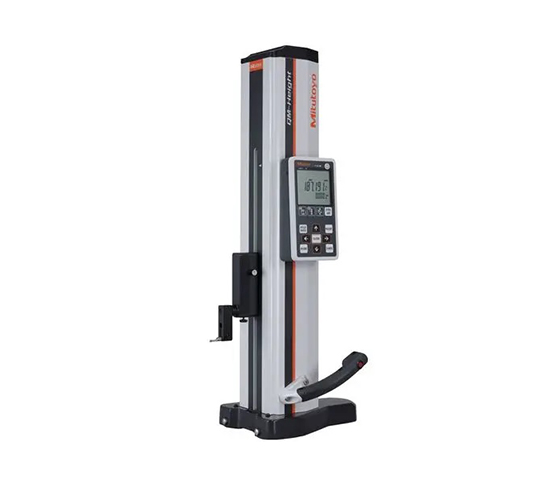
QM HEIGHT GAGE

MITUTOYO

view
x

Workshop Precision: The QM Height Gage Guide

Executing complex 2D height measurements quickly presents daily hurdles for quality control inspectors. Manual height gauges slow down production lines and increase operator error risks. The QM Height Gage resolves this inspection bottleneck by delivering high-accuracy 1D and 2D vertical measurement routines directly on shop floor granite plates.

This guide explores how integrating a QM height gauge elevates accuracy across manufacturing environments.

What Is the QM Height Gage?

The QM Height Gage is a high-precision, 2D measuring instrument manufactured by Mitutoyo for shop floor inspection.

Featuring a high-accuracy linear encoder, this instrument measures height, step distances, hole pitch, and inside/outside diameters. Technicians use built-in control panels to execute automatic calculation routines, eliminating complex manual geometric calculations.

Key Operational Advantages

Upgrading to a QM height gauge offers clear technical benefits for quality assurance labs:

  • Superior Accuracy: High-accuracy linear encoder delivers exceptional measurement accuracy down to (2.4 + 2.1L/600) µm.

  • Air-Cushion Base: Built-in pneumatic mechanism allows smooth, effortless gliding across granite surface plates.

  • Intuitive Control Panel: Icon-based buttons run complex ID, OD, and pitch measurements with single keystrokes.

  • Data Connectivity: Exports real-time data to statistical process control systems through Digimatic or wireless modules.

Common Workshop Applications

Machinists and quality technicians rely on QM height gages for critical daily tasks:

  1. Step Height Measurement: Verify vertical step heights on complex milled or turned components quickly.

  2. Hole Pitch and Center Checks: Measure distance between centerlines on multi-hole mounting plates.

  3. Internal and External Diameters: Inspect bore diameters and shaft thicknesses using touch-trigger probes.

  4. Machining Layout: Transfer precise reference dimensions to workpieces during pre-machining operations.

How to Measure Parts in 4 Easy Steps

Follow these simple steps to perform accurate 2D height inspection routines:

  1. Clean the Surface Plate: Wipe your granite plate and gauge base using alcohol wipes.

  2. Set Reference Zero: Lower the probe to touch the surface plate and zero the system.

  3. Position the Workpiece: Activate the air cushion to position the gage flush against your target component.

  4. Execute the Routine: Touch the target features with the probe and read calculated values instantly.

Final Thoughts

The QM Height Gage turns complex vertical inspection into fast, repeatable routines. By combining high accuracy with effortless operation, this reliable tool protects product quality and maintains strict manufacturing standards.

High-Performance Height Gage - QM-Height Series Best-in-class accuracy ±(2,4+2,1L/600)μm
  • Built-in air-suspension feature using an internal pump enables smooth movement over a surface plate. (Lower-cost version without air suspension also available)
  • Easy-to-view, simple control panel enables most measurements to be made with a single keystroke.
  • Eco-friendly product, operable for approximately 1200 hours with four AA alkaline batteries. (Four commercially available nickel hydride batteries can also be used.)
  • By installing the U-WAVE-T measurement data wireless communication system or USB communication driver in your PC, the optional functions that enhance operability, including output of measurement data to your PC, become available. The USB communication driver can be downloaded from the Mitutoyo website. (Communication software is separately required.): https://mitutoyo.eu/en_us/downloads/software-and-updates “d2” is a generic term given to Digimatic output that supports up to eight input/output digits. ID measurement & OD measurement
Buy Now
image description

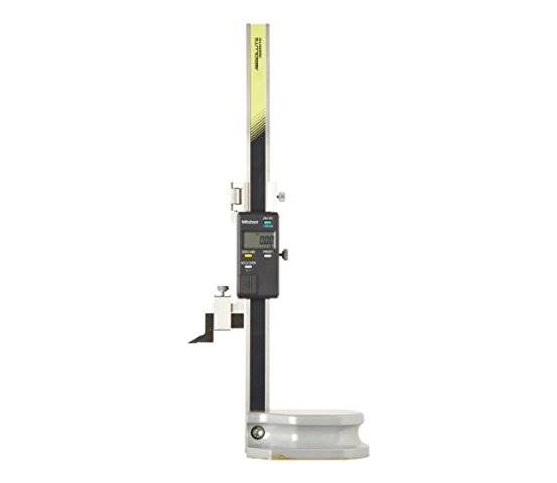
DIGIMATIC HEIGHT GAGE 570 series

MITUTOYO

view
x

Workshop Precision: DIGIMATIC HEIGHT GAGE 570 Series Guide

DIGIMATIC HEIGHT GAGE 570 series for precision vertical measurement, AI generated

Measuring vertical dimensions on machined parts manually creates inspection bottlenecks in busy workshops. Mechanical height scales require tedious eye alignment, which increases operator fatigue and reading errors. The DIGIMATIC HEIGHT GAGE 570 series resolves this quality challenge by combining an ABSOLUTE linear encoder with a clear digital screen for fast height checks.

This guide explores how integrating a 570 series height gauge elevates shop floor accuracy.

What Is the DIGIMATIC HEIGHT GAGE 570 Series?

The 570 series is a digital vertical measuring instrument manufactured by Mitutoyo for inspection and layout work.

Featuring built-in ABSOLUTE scale technology, this tool retains its origin point even after power cycling. Technicians slide the smooth handwheel carriage to measure part heights, step distances, and scribed reference lines directly on surface plates.

Key Operational Advantages

Upgrading to a 570 series digital height gauge provides clear technical benefits for machinists:

  • ABSOLUTE Encoder: Remembers setting origin automatically, eliminating zero-setting steps every time you turn the tool on.

  • Ergonomic Drive Wheel: Smooth slider feed wheel allows effortless coarse and fine positioning.

  • Carbide-Tipped Scriber: Hardened scriber tip marks clean layout lines directly onto tough metal workpieces.

  • SPC Data Output: Exports real-time measurement results directly to statistical process control networks.

Common Workshop Applications

Quality inspectors and machinists rely on the 570 series height gage for daily tasks:

  1. Machining Layout Work: Scribe precise horizontal reference lines onto raw castings before milling operations.

  2. Step Height Inspection: Measure vertical distances between parallel workpiece steps accurately.

  3. Location Verification: Check hole center heights from a granite reference surface plane.

  4. Tool Presetting: Transfer exact height dimensions to cutting tools and milling fixtures.

How to Measure in 4 Simple Steps

Follow these basic steps to perform accurate vertical measurement routines:

  1. Clean the Working Base: Wipe your granite plate and gage base using alcohol wipes.

  2. Set Initial Zero: Lower the scriber tip to touch the surface plate and zero your reading.

  3. Position the Part: Slide your target workpiece close to the gage column on the plate.

  4. Record the Reading: Rest the scriber onto your test surface and note the LCD value.

Final Thoughts

The DIGIMATIC HEIGHT GAGE 570 series converts complex vertical checks into fast, error-free tasks. By accelerating inspection routines, this reliable instrument protects product quality and maintains strict manufacturing standards.

Rigid structure makes instrument suitable for use in work environment ABS/INC measurement mode Hand Slider Type
Buy Now
image description

DIGIMATIC HEIGHT GAGE

MITUTOYO

view
x

MIUTOYO Speed Up Quality Control with a Digimatic Height Gage

Accurate vertical measurement keeps modern manufacturing lines running smoothly. Traditional vernier height gages take time to read and invite human error. A digimatic height gage modernizes your shop floor by combining precision mechanics with instant digital readouts. This essential tool helps quality control teams inspect parts faster and maintain strict production tolerances.

What Is a Digimatic Height Gage?

A digimatic height gage measures vertical distances, part heights, and scribe lines with extreme accuracy. It rests on a heavy, flat reference surface like a granite plate. Instead of reading fine mechanical scales, operators view precise digital numbers on a clear LCD screen. Many models also include SPC data outputs to send measurement data straight to your computer.

Major Advantages for Modern Machine Shops

  • Instant Digital Readouts: Bright LCD screens display precise values immediately. Operators eliminate reading errors, zero-point miscalculations, and parallax issues caused by bad lighting.

  • Rapid Zero-Setting and Hold Functions: Set a reference zero anywhere along the column with one button press. You can quickly calculate differential dimensions without manual math.

  • High-Precision Linear Encoders: Advanced electronic encoders deliver stable, repeatable accuracy even during rapid height adjustments.

  • Rugged Heavy-Duty Base: Rigid cast-iron or granite bases provide solid grounding. This heavy footprint prevents tipping, dampens vibration, and preserves calibration integrity.

Common Industry Applications

  1. Machined Part Inspection: Measure step heights, hole locations, and surface flatness across metal components quickly.

  2. Layout and Precision Scribing: Attach a carbide-tipped scriber to mark accurate reference lines directly onto raw metal workpieces.

  3. Toolroom Calibration: Verify fixture dimensions and jig alignments against engineering blueprints efficiently.

  4. Automated Data Logging: Connect SPC cables to log dimensional data directly into your quality management software.

Upgrade Your Measurement Workflow Today

Slow, manual height checks drain shop productivity and increase costly scrapped parts. A digimatic height gage delivers the speed, digital accuracy, and data connectivity your inspection line needs. Explore our complete selection of digimatic height gages today to boost your quality control efficiency.

Digital height gauge with Ergonomic Base Data hold, preset and direction changeover are all touch button controlled Features include in./mm conversion, battery low indicator, ABS/INC function, and fine feed

Large character height of 11 mm provides good readability.

Supplied with

2 x SR44 batteries.

Buy Now
image description

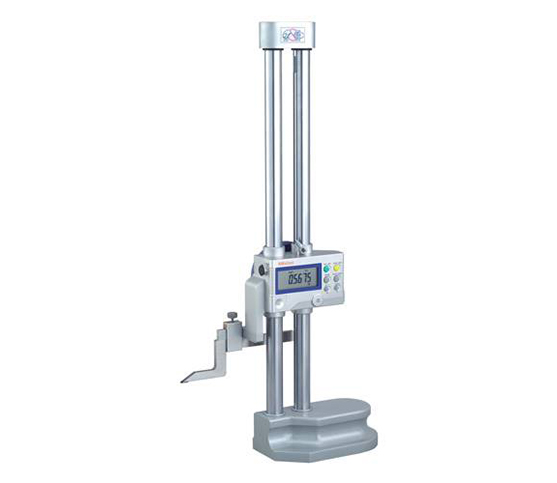
DIGIMATIC HEIGHT GAGE

MITUTOYO

view
x

Boost Shop Efficiency with a Digimatic Height Gage

In a fast-paced workshop, manual measurements can slow you down. Therefore, a Digimatic Height Gage is the perfect upgrade for modern manufacturing. This tool replaces traditional vernier scales with a clear digital display. Consequently, operators read dimensions faster and avoid costly human errors.

Why Choose Digital Measurement?

Digital technology offers immediate benefits for quality control. For instance, the large LCD screen provides instant feedback. Furthermore, you can switch between inches and millimeters with one button. Because these gages use precision electronic encoders, they offer repeatable accuracy. As a result, your team spends less time squinting at scales and more time producing parts.

Key Advantages for Your Workflow

Modern height gages offer several functional improvements.

  • First, the data output port allows you to send readings directly to a computer.

  • Next, the robust base ensures stability on surface plates.

  • Additionally, most models include a "Zero" function for easy comparison measurements.

  • Finally, the carbide-tipped scriber allows you to mark workpieces with extreme precision.

Achieve Better Quality Control

Moreover, these gages handle various tasks beyond simple height checks. You can measure depths, steps, and thicknesses with ease. Similarly, adding a dial indicator attachment expands its versatility further. Thus, one tool handles multiple inspection steps. In conclusion, investing in digital technology streamlines your entire production process.

If you want to reduce scrap and improve speed, this tool is essential. Upgrade your facility today with a professional digital solution.

Double column structure ensures high accuracy Ergonomic base fits comfortably in hand Hand wheel standard type Available range 300, 600, 1000mm
Buy Now
image description

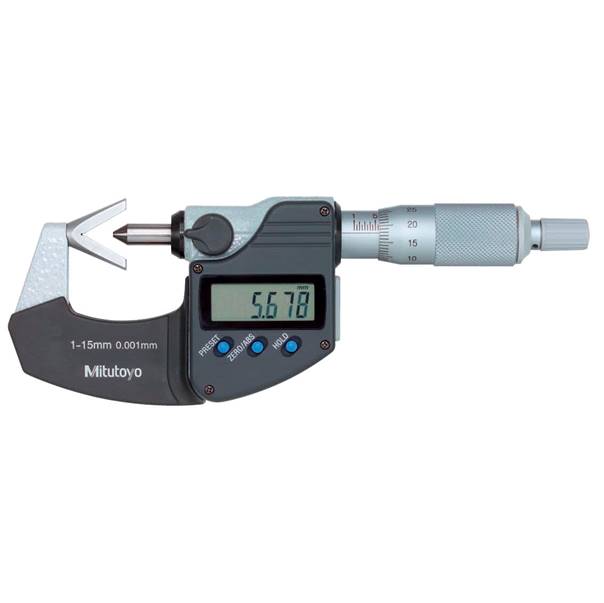
V-ANVIL MICROMETER

MITUTOYO

view
x

Master Odd-Fluted Parts: Why You Need a V-Anvil Micrometer

Measuring 3-flute or 5-flute cutting tools with a standard two-point micrometer often gives incorrect diameter readings. Flat anvils cannot seat correctly across odd-numbered flutes. A V-anvil micrometer solves this measurement challenge. Designed specifically for odd-lobed and multi-fluted parts, this specialized tool delivers fast, reliable, and highly accurate outer diameter measurements on complex cutting tools.

What Is a V-Anvil Micrometer?

A V-anvil micrometer features a V-shaped anvil block combined with a single flat spindle tip. The V-groove securely cradles round workpieces or odd-fluted parts. As the spindle contacts the top edge, the V-block holds the centerline perfectly aligned. This unique geometric arrangement allows technicians to accurately calculate pitch diameters, roundness errors, and tool dimensions.

Key Benefits for Precision Toolmakers

  • Accurate Odd-Flute Measurement: The precise V-angle supports 3-flute or 5-flute taps, end mills, and reamers. You measure exact cutting diameters without guesswork or extra math.

  • Detect Out-of-Roundness: Mechanics use V-anvil micrometers to spot centerless grinding errors and lobing defects that traditional two-point tools completely miss.

  • Carbide-Tipped Measuring Faces: Hardened carbide surfaces on both the V-block and spindle tip resist heavy wear, preserving long-term tool calibration.

  • Ratchet Stop Consistency: Built-in ratchet thimbles apply uniform measuring force. Operators achieve repeatable results regardless of individual user touch.

Primary Shop Floor Applications

  1. Cutting Tool Manufacturing: Measure the outside diameter of 3-flute and 5-flute taps, reamers, and milling cutters.

  2. Centerless Grinding Inspection: Check cylindrical parts for subtle tri-lobe or penta-lobe out-of-roundness conditions.

  3. Pitch Diameter Checks: Determine tap pitch diameters rapidly during quality control inspections.

  4. Automotive Component Milling: Inspect odd-grooved shafts, splines, and small engine components accurately.

Enhance Your Inspection Accuracy Today

Inaccurate tool measurements lead to out-of-spec machining and costly scrap. A V-anvil micrometer gives your quality assurance team the specialized geometry required for complex, odd-fluted workpieces. Explore our full range of high-precision V-anvil micrometers today to keep your shop floor running flawlessly.

Measures the outside diameter of cutting tools such as taps, reamers, end mills. Which have 3 flutes Carbide spindle face
Buy Now
image description

CONTACT POINT

MITUTOYO

view
x

Unlock Measurement Accuracy: Choosing the Right Contact Point

Small accessories often make the biggest difference in precision measurement. While dial indicators and height gages provide high-precision electronic readouts, the contact point actually touches your workpiece. Selecting the right measuring tip ensures accurate surface tracking, prevents material scratch damage, and protects your instrument calibration.

What Is a Contact Point?

A contact point is the replaceable tip threaded onto the spindle of a dial indicator, test indicator, or linear gage. It transfers tiny physical surface variations directly to the internal measuring mechanism. Depending on your material type and part geometry, you can choose various tip shapes—such as spherical, flat, needle, or roller tips—to optimize your inspection setup.

Major Benefits of Quality Measuring Tips

  • Superior Wear Resistance: Premium contact points feature carbide, ruby, or hardened steel tips. These tough materials withstand constant friction without developing flat spots that ruin calibration.

  • Match Complex Part Geometry: Specialized shapes let you reach deep grooves, measure thin slots, or sweep across rough surfaces smoothly without snagging.

  • Protect Sensitive Workpieces: Non-marking materials like ruby or synthetic sapphire prevent surface scratches on polished optical parts, soft aluminum, and delicate plastics.

  • Standardized Threading: Universal M2.5 or 4-48 UNF threads allow technicians to swap points quickly across different indicator brands and inspection stations.

Primary Applications in Quality Control

  1. Flatness and Runout Testing: Use flat or ball tips to measure surface variation on rotating shafts and flat plates.

  2. Deep Groove Inspections: Attach extended needle points to reach narrow internal channels and deep recessed holes.

  3. Continuous Web Monitoring: Mount roller-style points to track moving sheet metal, paper, or plastic film without tearing the material.

  4. Soft Material Measurement: Utilize large-diameter flat tips to distribute measuring pressure evenly on soft rubber or foam parts.

Upgrade Your Measuring Setup Today

Worn or improper measuring tips compromise your entire inspection system. Equipping your tools with the ideal contact point guarantees reliable readings, longer instrument life, and better product quality control. Explore our complete selection of indicator contact points today to find the exact tip for your shop setup.

Flat point (Carbide) Many diferent types of contact point to select
Buy Now
image description

NEEDLE CONTACT POINT

MITUTOYO

view
x

Reach Deep Recesses: Why You Need a Needle Contact Point

Standard spherical indicator tips work great for flat surfaces, but they fail when inspecting tight spaces. Thick, rounded tips simply cannot penetrate small holes, deep grooves, or narrow slots. A needle contact point solves this exact reach issue. Featuring a slender, pointed shaft, this essential accessory allows technicians to measure hard-to-access part features with complete accuracy.

What Is a Needle Contact Point?

A needle contact point is a specialized tip that threads onto dial indicators, test indicators, and electronic depth gages. It features a fine, narrow probe tip—often made of hardened steel or durable carbide. This elongated design reaches deep into tiny crevices, transmitting small surface variations directly to your measuring instrument.

Top Advantages for Precision Inspection

  • Access Ultra-Narrow Features: The slim profile easily slides into small keyways, narrow splines, deep grooves, and recessed internal steps.

  • Pinpoint Measurement Accuracy: A sharp point contacts extremely small target areas, giving you precise positional data on complex machined geometries.

  • Exceptional Wear Resistance: Crafted from hardened steel or solid carbide, these probe tips resist bending, chipping, and surface wear over thousands of cycles.

  • Universal Thread Compatibility: Standardized M2.5 or 4-48 UNF mounting threads let you swap needle points quickly onto your existing indicator tools.

Primary Industry Applications

  1. Groove and Slot Inspection: Measure the depth and bottom surface flatness of narrow internal snap-ring grooves.

  2. PCB and Electronic Testing: Reach around crowded circuit board components to test precise contact heights.

  3. Small Hole Inspections: Inspect internal shoulder distances and small chamfers inside drilled workpieces.

  4. Toolroom Setup: Align delicate dies, molds, and fixture stops in cramped machining environments.

Upgrade Your Measurement Reach Today

Do not let hard-to-reach features slow down your quality control workflow or lead to missed defects. A needle contact point gives your dial indicators the extended reach and pinpoint precision your toughest projects demand. Explore our full selection of needle contact points today to equip your shop with the right inspection tools.

Needle point Many different types of contact point to select
Buy Now
image description

CONTACT POINT - Extension / Converter

MITUTOYO

view
x

Extend Your Reach: The Power of a Contact Point Extension / Converter

Standard dial indicators often lack the physical reach or thread compatibility needed for complex part inspections. Deep engine blocks, recessed channels, and mixed-brand tooling setups create frequent measurement bottlenecks. A contact point - extension / converter solves these challenges instantly. This practical accessory extends your probe length and adapts different thread sizes to maximize your indicator's versatility.

What Is a Contact Point Extension / Converter?

This specialized accessory serves two main functions in precision measurement. Extensions add physical length to your indicator spindle, allowing standard contact points to reach deep internal features. Converters adapt various male and female thread pitches—such as converting M2.5 metric threads to 4-48 UNF imperial threads—so you can connect non-matching tips to your measuring instruments seamlessly.

Key Advantages for Quality Control Teams

  • Reach Deep Recessed Features: Extension rods let probes penetrate deep bores, tall fixture cavities, and narrow engine cylinders without moving the main indicator setup.

  • Bridge Thread Compatibility Gaps: Converters connect metric indicator tips to imperial shafts or vice versa. You save money by reusing existing tip inventories across different tool brands.

  • Maintain Rigid Measurement Integrity: Ground stainless steel construction prevents probe flex, ensuring accurate linear transfer and reliable data readings.

  • Quick Shop Floor Installation: Knurled grips and standard threading allow technicians to swap extensions and adapters manually in seconds without special tools.

Common Shop Floor Applications

  1. Deep Bore Inspections: Measure internal step depths and cylinder wall variations far below the surface.

  2. Multi-Brand Equipment Setup: Adapt specialized indicator tips to fit non-native gauge handles and depth bases.

  3. Complex Jig Alignment: Extend reach into crowded machining fixtures to verify reference surfaces directly.

  4. Custom Toolroom Gaging: Build specialized, extended measuring probes for one-off quality testing.

Upgrade Your Inspection Versatility Today

Do not let short probes or mismatched threads halt your quality assurance process. A contact point extension / converter gives your measurement gear the reach, adaptability, and rigid performance your shop needs. Browse our full range of extensions and thread converters today to expand your inspection capabilities.

Extension rod Many different types of contact point to select
Buy Now